01. Getting Started with Odoo Accounting
Introduction to Odoo Accounting
Understand the Accounting dashboard and key finance functions
Video Link:

Setting Up a Company in Odoo
Configure company information, currency and accounting settings
Video Link:
Understanding the Chart of Accounts
Learn account types, account codes and account structures
Video Link: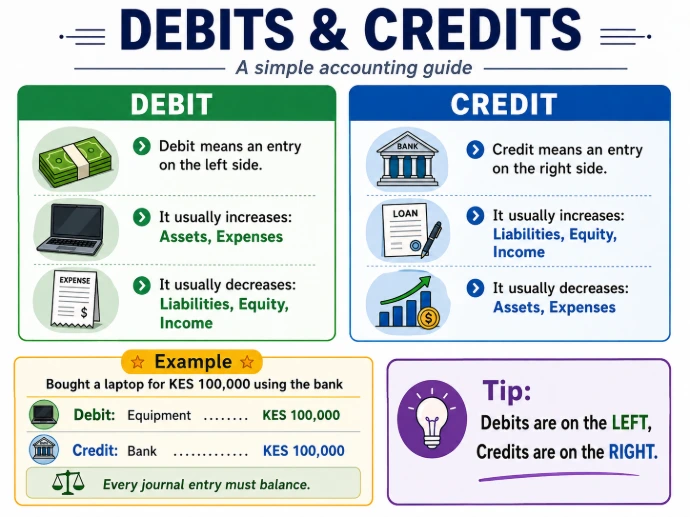
Debits & Credits in Odoo
See what happens behind every Odoo transaction
Video Link:
How Journals Work in Odoo
Sales, Purchase, Bank, Cash and Miscellaneous journals
Video Link:- A journal is like the diary of a business. It is where financial transactions are recorded, showing what happened, when it happened, which accounts were affected, and the amount.
- Journaling means the act of recording those transactions in the journal.
- Computer/Equipment increases → Debit KES 100,000
- Bank decreases → Credit KES 100,000
That recording is called a journal entry.
Transaction → Journal Entry → General Ledger → Financial Reports
And in Odoo, a Journal is also used to group similar transactions. For example:
- Sales Journal → Customer invoices
- Purchase Journal → Vendor bills
- Bank Journal → Bank transactions
- Cash Journal → Cash transactions
- Miscellaneous Journal → Adjustments and manual journal entries
A journal is where accounting transactions are recorded and organized. Journaling is simply the process of recording those transactions.”

Opening Balances
How to bring balances from an existing accounting system
Video Link:
Accounting Localization
Understand taxes, accounts and country-specific settings
Video Link:
Accounting User Access
Configure appropriate access for accountants and finance users
Video Link:02. Customer Invoices & Accounts Receivable

Creating a Customer Invoice
Customer → Invoice → Post
Video Link:

Creating a Customer Invoice
Quotation → Sales Order → Invoice
Video Link:

Registering Customer Payments
Invoice → Payment
Video Link:

Partial Customer Payments
Invoice → Partial Payment → Outstanding Balance
Video Link:

Customer Deposits & Advance Payments
Deposit → Final Invoice
Video Link:

Customer Credit Notes
Invoice → Credit Note → Reconciliation
Video Link:

Customer Statements
Review customer activity and outstanding balances
Video Link:

Aged Receivables
Identify overdue customer balances
Video Link:

Customer Follow-ups
Manage debt collection
Video Link:

Customer Credit Limits
Control exposure before making further sales
Video Link: